Compliance Management
 Risk Management
 Third Party Risk Management
 Data Privacy Management
 Internal Auditing
 Business Continuity Management
 Continuous Control Monitoring (CCM)
 Trust Center
 AI Governance
Complete Guide to Risk Registers: Structure & Best Practice 2026
Highlights
- A risk register is not a risk assessment. A risk register is a structured record of the risks facing an organisation, capturing likelihood and impact scores, risk owners, controls, and mitigation actions. A risk assessment is the activity of identifying and evaluating those risks. The register is the ongoing record where assessment results are tracked over time.
- Every risk needs a named owner. Risks without a clearly accountable person rarely move forward. Assign both a risk owner (accountable for the overall risk) and action owners (responsible for specific mitigation tasks).
- Score inherent and residual risk separately. Inherent risk is your exposure before any controls. Residual risk is what remains after. The gap between the two shows whether your controls are actually working.
- Vague descriptions are the most common failure. An entry without a clear cause and consequence is a worry list, not a risk register. Every risk should state what could go wrong, why, and what the impact would be.
- Static spreadsheets have limits at scale. Version control problems, no audit trail, and fragmented reporting make spreadsheet-based registers hard to trust as organisations grow. Platform-based registers connect risks, controls, incidents, and KRIs in one place.
- Review frequency should match risk rating. High and medium risks should be reviewed at least quarterly. Out-of-date scoring is one of the most common risk register failures in practice.
Introduction
Over Easter weekend 2025, a ransomware attack on Marks & Spencer brought down contactless payments, halted automated stock ordering, and suspended online shopping entirely. The retailer — with 65,000 staff and over 1,400 stores — had to revert to manual processes to track fresh food and clothing supplies, leaving shelves bare for weeks. By the end of the following six months, statutory pre-tax profits had fallen from £391.9 million to just £3.4 million. The attack also cascaded outward: Co-op and Harrods were disrupted in the same period, and a National Crime Agency investigation drew scrutiny to third-party access management weaknesses across the retail sector.
The incident showed how a single attack can move faster than most risk registers are reviewed — disrupting operations, triggering regulatory attention, and reshaping board priorities within days.
Across sectors, similar cyber attacks, supply chain disruptions, and cloud outages show how quickly risk now moves across an extended enterprise. A single incident can affect customers, partners, and regulators within hours. Boards expect clear evidence that organisations understand their material risks and track them in a consistent way.
A risk register is one of the simplest tools in a governance, risk, and compliance programme. It is also one of the most powerful.
A well-designed risk register:
- Brings strategic, operational, cyber, compliance, and financial risks into one place.
- Uses consistent risk scoring so leaders can compare entries.
- Links each risk to owners, controls, and actions.
- Supports clear reporting to the board and regulators.
This guide is written for senior risk, compliance, and GRC leaders. It covers what a risk register is and why it matters, how to build one from scratch, best practice examples, common mistakes, and how to move from static spreadsheets to more dynamic, intelligence-driven registers.
Why the Risk Register Remains the Backbone of Risk Management
Modern organisations rarely rely on a single risk register. Variants appear across enterprise risk programmes, operational risk functions, cybersecurity risk registers, compliance and regulatory reporting, and project and programme risk registers. The challenge is not only to list risks but to keep each register focused, accurate, and usable.
Treat the risk register as a living tool, not a filing cabinet. Done well, it becomes the backbone of your risk management programme and a single source of truth for risk-based conversations.
Read more: What is Risk Management in Cybersecurity?
What Is a Risk Register?
A risk register is a structured record of the risks that could affect an organisation, project, or programme, along with their ratings, owners, and responses. By capturing risks in a consistent format, it helps leaders see what matters most and decide what to do next.
At enterprise level, a risk register contains strategic, financial, operational, cyber, and compliance risks that could affect business objectives. At project level, it focuses on delivery threats such as schedule delays, cost overruns, supplier failures, or technical uncertainty.
Purpose of a Risk Register
The purpose of a risk register is to:
- Capture identified risks in a structured and consistent format.
- Support visibility so risks do not sit hidden inside teams or systems.
- Enable prioritisation so attention goes to material risks.
- Underpin mitigation planning and ongoing monitoring.
- Help each risk owner make decisions based on standardised risk scoring instead of guesswork.
- Risk identification and assessment are activities.
- The risk register is the record that stores the results.
Risk registers were popularised in project management and have since expanded into wider enterprise risk management frameworks. Today, they are foundational in internal audit, operational risk, cybersecurity, and regulatory reporting.
The Risk Register in the Risk Management Cycle
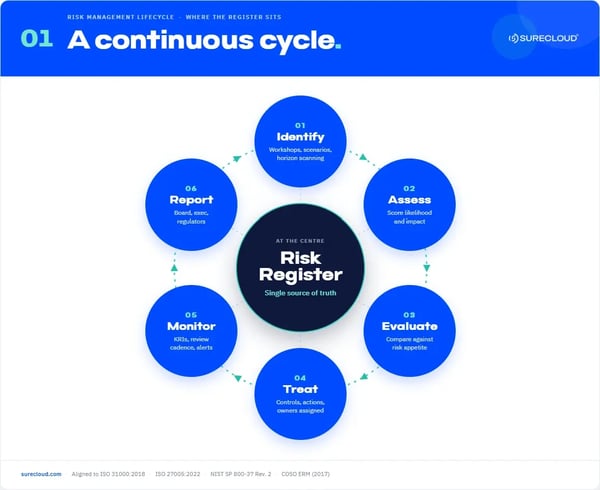
The risk register sits inside a simple risk management cycle:
Identify → Assess → Evaluate → Treat → Monitor → Report
Risk identification and risk assessment activities produce the input. Workshops, interviews, data analysis, and scenarios uncover what could go wrong and how serious it might be. The risk register is the single source of truth where those outputs are captured in a repeatable way for ongoing use.
A risk register is not the same as risk identification or assessment:
- Risk identification and assessment are activities.
- The risk register is the record that stores the results.
A risk assessment helps you understand the danger. The risk register keeps track of everything that could go wrong, what you are doing about it, and whether it is getting better or worse.
The Core Components of a Risk Register
A good risk register template does more than list risk titles and colour ratings. It captures enough structured information for risk owners, audit teams, and senior leaders to understand each risk clearly and compare risks consistently.
|
Component |
What it captures |
Why it matters |
Example |
|
Risk ID |
A unique identifier for each risk |
Prevents confusion and supports audit trails |
R-2026-014 |
|
Risk title |
Short, clear name for the risk |
Allows quick scanning of the register |
Payment service outage due to third-party failure |
|
Full risk description |
Clear statement of the risk and its context |
Avoids vague entries and clarifies what could go wrong |
Failure of the third-party payment gateway could prevent customers from making online payments, leading to lost revenue and complaints |
|
Cause |
Underlying reasons the risk could materialise |
Informs control design and mitigation actions |
Single point of failure in the payment provider and limited failover testing |
|
Consequence / impact description |
What happens if the risk occurs |
Supports meaningful impact scoring and communication |
Missed sales, customer dissatisfaction, and potential regulatory scrutiny |
|
Risk category |
Type of risk (strategic, operational, cyber, compliance) |
Enables reporting by category and dashboard views |
Operational risk, linked to the cyber risk register |
|
Likelihood score |
Probability of the risk occurring, using a defined scale |
Enables consistent scoring across risks |
Likelihood 4 on a 1-5 scale |
|
Impact score |
Severity of impact if the risk occurs |
Distinguishes minor issues from material threats |
Impact 5 on a 1-5 scale |
|
Overall risk rating |
Combined likelihood and impact score |
Drives prioritisation and escalation |
High risk (4 x 5) |
|
Inherent risk rating |
Risk level before any controls are applied |
Shows raw exposure |
Very high |
|
Residual risk rating |
Risk level after existing controls |
Demonstrates control effectiveness and gaps |
Medium after new controls |
|
Controls in place |
Key preventive and detective controls |
Connects risk to control design and assurance |
Daily backups, quarterly access reviews, real-time monitoring |
|
Mitigation plan |
Planned actions to reduce risk further |
Turns risk awareness into action |
Implement multi-region failover, strengthen supplier due diligence |
|
Risk owner |
Person accountable for managing the risk |
Risks without owners rarely move |
Chief Information Security Officer |
|
Assurance / oversight owner |
Independent oversight function |
Supports audit and second-line challenge |
Head of Internal Audit |
|
Status |
Current state of the risk |
Signals direction of travel |
Open, actions on track |
|
Target risk score |
Desired residual rating after actions |
Aligns risk management to appetite |
Medium within six months |
|
Review date |
Next planned review |
Embeds a regular review cycle |
31 December 2026 |
|
Linked records |
Related incidents, controls, KRIs, or audits |
Connects risk to evidence and outcomes |
Incident INC-2026-017, Control CM-12, Audit IA-2026-03 |
The Simplest Possible Risk Register
At its most basic, a risk register can consist of just three elements:
|
Core element |
Description |
|
Risk description |
What could go wrong and why |
|
Risk owner |
Who is accountable |
|
Risk rating |
How serious the risk is |
However, this level of detail is rarely sufficient for modern organisations. Most corporate risk registers require the additional components above to support governance, assurance, and informed decision-making. Rather than starting from scratch, use a risk register template that includes these fields and tailor it to your organisation's size, sector, and regulatory obligations.
How to Build a Risk Register: Step by Step
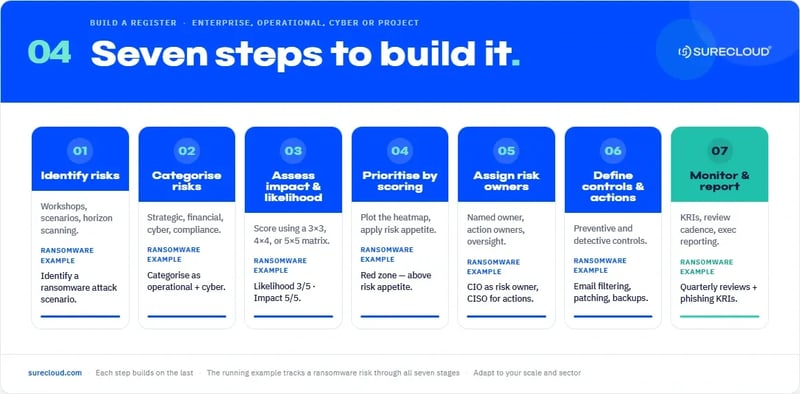
The seven stages below form a practical framework you can apply to an operational risk register, a cybersecurity risk register, or a project-level risk register. Each step uses a ransomware attack on core customer systems as a running example.
Step 1: Identify risks
Use a mix of methods:
- Workshops and risk brainstorming sessions.
- Scenario analysis and tabletop exercises.
- Interviews with business and technical stakeholders.
- Horizon scanning for regulatory, geopolitical, and technology change.
Think about where risks originate: strategy and business model, technology and data, operations and processes, suppliers and third parties, and people and culture.
Example: you identify the risk that a ransomware attack on core customer systems could disrupt access to critical services and data.
Step 2: Categorise risks
Apply a clear taxonomy so risks can be grouped and reported consistently: strategic, financial, operational, cyber, and compliance and regulatory. Consistent categorisation supports reporting, heatmaps, and alignment with enterprise risk views.
Example: you categorise the ransomware scenario as an operational and cyber risk linked to your core customer platform.
Step 3: Assess impact and likelihood
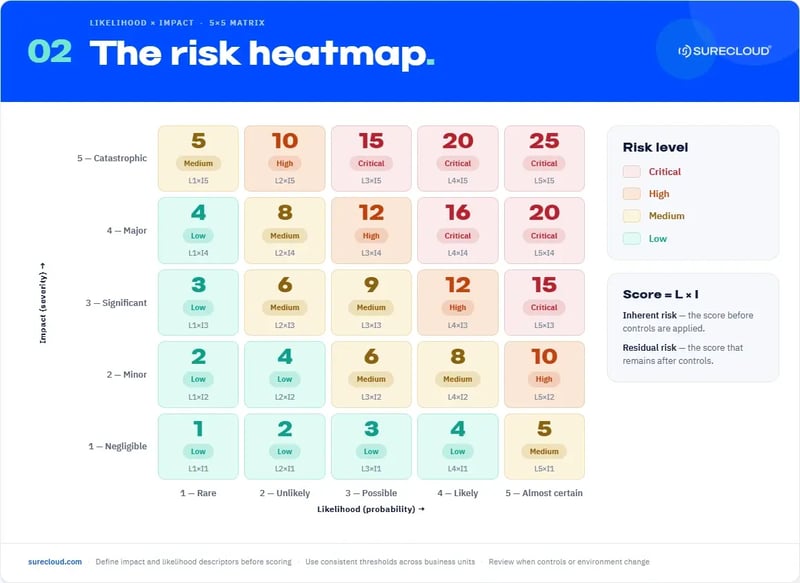
Choose a scoring model that matches your needs: 3x3, 4x4, or 5x5. Define what low, medium, and high impact look like in your context before scoring begins. Inconsistent definitions produce inconsistent registers.
Example: based on sector incidents and your own environment, you score ransomware likelihood as 3 of 5 and impact as 5 of 5.
Step 4: Prioritise based on scoring
Use risk scores to decide which risks need attention first. Plot risks on the heatmap, apply red, amber, green thresholds, and compare scores against risk appetite and tolerance. High-scoring risks above appetite become priority items for action and closer monitoring.
Example: the 3x5 ransomware score places this risk in the red zone on your heatmap, above appetite, so it becomes one of your top priority risks.
Step 5: Assign risk owners
Every material risk should have a named owner:
- Risk owner: accountable for the overall risk and its treatment.
- Action owners: responsible for specific mitigation tasks.
- Oversight functions: provide challenge and independent assurance.
Example: you assign the CIO as risk owner, security and IT operations managers as action owners, and internal audit as the oversight function for ransomware risk.
Step 6: Define controls and mitigation actions
Document both existing controls and planned actions:
-
Preventive controls: aim to stop the risk from materialising.
- Detective controls: help you identify events quickly when they occur.
Example: for the ransomware risk, you record existing controls such as email filtering, endpoint protection, patching, and backups, and add actions to improve restore testing, tighten patching SLAs, and expand phishing training.
Step 7: Establish monitoring and reporting
Set review frequencies based on risk rating, define key risk indicators, and integrate risks into regular reporting to executive and board level.
Example: for the ransomware risk, you set quarterly reviews, define KRIs such as phishing click rates and backup success rates, and include the risk in your regular executive risk report.
Risk Assessment vs. Risk Register: The Key Difference
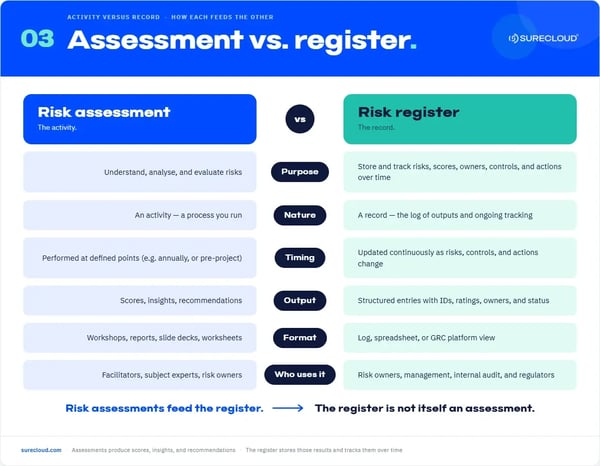
A risk assessment is the process of identifying, analysing, and evaluating risks. It is an activity. A risk register is the structured record of those risks, their scores, owners, controls, and actions. It is the log that stores the results of assessments and ongoing monitoring.
In simple terms: a risk assessment produces understanding; the risk register keeps that understanding organised and usable over time. Risk assessments feed the risk register. They generate scores, impact descriptions, and recommendations, which become structured entries in the register with IDs, owners, ratings, controls, and actions.
|
Aspect |
Risk assessment |
Risk register |
|
Purpose |
Understand and analyse risks |
Store and track risks and responses over time |
|
Timing |
Performed at defined points |
Updated as risks, controls, and actions change |
|
Output |
Scores, insights, recommendations |
Structured entries with fields, ratings, and status |
|
Format |
Workshops, reports, slide decks, worksheets |
Log, spreadsheet, or GRC platform view |
|
Stakeholders |
Facilitators, experts, risk owners |
Risk owners, management, internal audit, and regulators |
Example: you run a risk assessment on phishing attacks against staff. The assessment identifies scenarios, scores likelihood and impact, and notes vulnerable groups and existing controls. It concludes that ransomware delivered via phishing could disrupt key services and trigger regulatory notifications.
Those details then become a structured entry in the cybersecurity risk register, with a risk ID, title and description, likelihood and impact scores, an overall rating, linked controls, mitigation actions, a risk owner, and a review date.
Who Is Responsible for Creating and Maintaining the Risk Register?
In practice, the risk register is prepared and updated by risk owners and their teams, coordinated by the central risk or compliance function. Different parts of the organisation contribute entries and updates for their areas, using a common template and governance model.
Typical Ownership Models
- Enterprise risk: risk and compliance team, coordinating a corporate risk register.
- Operational risk: department leaders or process owners, maintaining operational risk registers.
- Project risk: project managers, maintaining project risk logs and registers.
- Cyber risk: security team in partnership with the central risk function, maintaining the cybersecurity register.
Role of the Risk Owner
The risk owner is accountable for:
- Monitoring the risk and its indicators.
- Deciding whether the level of risk is acceptable.
- Making sure actions are defined and completed.
- Keeping entries up to date in line with review dates.
Role of Senior Leadership and the Board
Senior leaders and the board:
-
Approve risk appetite and tolerance.
-
Review high-impact and emerging risks.
-
Challenge whether risk registers are complete and aligned with strategy.
- Use risk register outputs to inform priorities and decisions.
Simple RACI for a High-Impact Cyber Risk
|
Role |
Who |
|
Responsible |
Security and IT operations managers |
|
Accountable |
CIO (risk owner) |
|
Consulted |
Business unit leaders and the data protection officer |
|
Informed |
Executive committee and board risk committee |
Auditors and assurance teams validate risk data and test whether the register is accurate, complete, and supported by evidence in controls, incidents, and reporting.
Real Examples of High-Quality Risk Register Entries
The examples below show how detailed entries can be structured and then adapted to your organisation's context.
Example 1: Cybersecurity Risk
|
Field |
Entry |
|
Description |
Ransomware attack on core customer systems that disrupts services and access to data |
|
Cause |
Phishing emails, unpatched vulnerabilities, and limited restore testing |
|
Impact |
Service outage, restoration effort, regulatory notifications, and reputational damage |
|
Likelihood |
3 of 5 based on sector incidents and current controls |
|
Rating |
Inherent very high, residual high |
|
Controls |
Email filtering, endpoint protection, patch management, network segmentation, offline backups |
|
Actions |
Improve backup restore testing, tighten patching SLAs, expand phishing training, review incident response playbooks |
|
Owner |
Chief Information Security Officer |
|
Next review |
30 September 2026 |
Example 2: Regulatory Non-Compliance
|
Field |
Entry |
|
Description |
Failure to comply with data protection requirements affecting customer data in key jurisdictions |
|
Cause |
Incomplete mapping of personal data, third-party processors, and cross-border transfers |
|
Impact |
Regulatory fines, remediation costs, increased oversight, and reputational damage |
|
Likelihood |
2 of 5, reflecting partial preparation and limited visibility of suppliers |
|
Rating |
Inherent high, residual medium |
|
Controls |
Data protection impact assessments, privacy training, contract reviews, records of processing activities |
|
Actions |
Complete data mapping, update supplier contracts, implement privacy by design checkpoints in change processes |
|
Owner |
Data Protection Officer |
|
Next review |
31 December 2026 |
Example 3: Data Loss
|
Field |
Entry |
|
Description |
Accidental deletion or corruption of critical financial data that cannot be quickly restored |
|
Cause |
Manual processing errors, broad admin access, and lack of change control on key systems |
|
Impact |
Delayed financial reporting, audit findings, and potential misstatements in management information |
|
Likelihood |
3 of 5 given current manual steps and access patterns |
|
Rating |
Inherent high, residual medium |
|
Controls |
Role-based access control, change control for financial systems, daily backups, backup integrity checks |
|
Actions |
Reduce admin access, introduce approvals for bulk changes, strengthen backup monitoring, test restore procedures more frequently |
|
Owner |
Head of Finance Operations |
|
Next review |
31 October 2026 |
Example 4: Operational Service Outage
|
Field |
Entry |
|
Description |
Extended outage of the key customer service platform affecting contact centre and online self-service |
|
Cause |
Single cloud region dependency, limited failover capability, and incomplete disaster recovery testing |
|
Impact |
Inability to serve customers, complaints, churn, and potential breach of service level agreements |
|
Likelihood |
3 of 5 based on current architecture and incident history |
|
Rating |
High |
|
Controls |
Monitoring and alerting, documented disaster recovery plan, vendor support arrangements |
|
Actions |
Implement multi-region failover, perform regular disaster recovery tests, review vendor resilience and contract terms |
|
Owner |
Director of Customer Operations |
|
Next review |
30 September 2026 |
Example 5: Financial Liquidity Risk
|
Field |
Entry |
|
Description |
Insufficient liquid funds to meet short-term obligations during a period of revenue stress or market disruption |
|
Cause |
High reliance on short-term funding, limited cash flow forecasting, and slow access to contingency credit lines |
|
Impact |
Inability to meet payment obligations, covenant breaches, higher funding costs, and loss of stakeholder confidence |
|
Likelihood |
2 of 5 in normal conditions, rising in stressed scenarios |
|
Rating |
Inherent high, residual medium |
|
Controls |
Cash flow forecasting, liquidity buffers, committed credit facilities, investment limits, treasury policies |
|
Actions |
Enhance stress testing, increase liquidity buffers, renegotiate credit facilities, tighten working capital management |
|
Owner |
Chief Financial Officer |
|
Next review |
31 March 2027 |
Common Mistakes to Avoid in Risk Registers
Even experienced teams fall into common traps when creating and maintaining risk registers. Recognising these patterns makes them easier to avoid.
- Vague risk descriptions with no clear cause or consequence.
- Recording issues and incidents instead of genuine uncertainties.
- Too many risks with no sense of priority or risk appetite.
- Missing or unclear risk owners.
- Out-of-date scoring that does not reflect current controls or environment.
- Missing controls or actions, so the register becomes only a list of worries.
- Inconsistent formats across business units, making aggregation difficult.
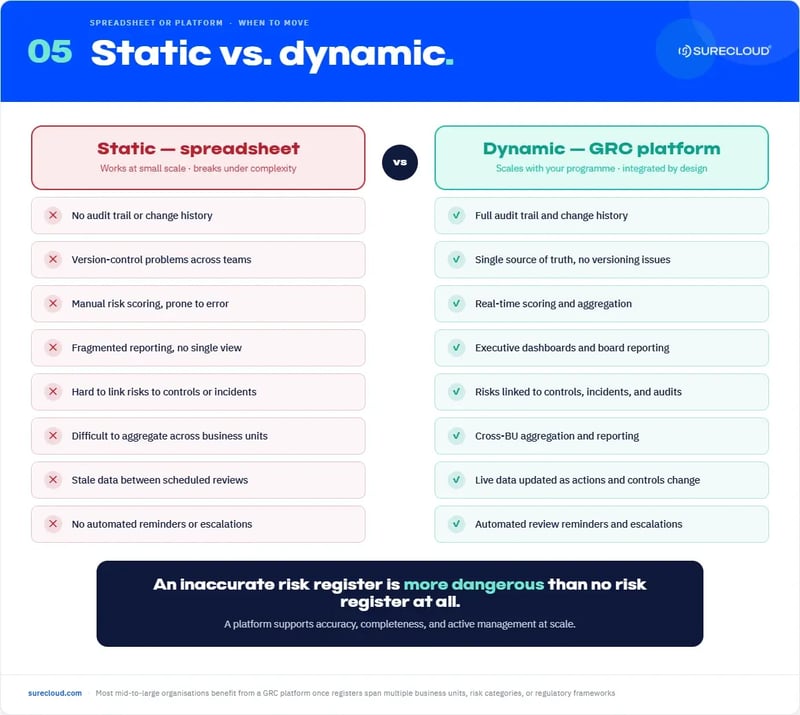
- Static spreadsheets that are rarely updated or linked to incidents, KRIs, or audits.
An inaccurate risk register is more dangerous than having no risk register at all. It creates false confidence that risks are understood and managed when they are not. The goal is not to list everything that could go wrong. It is to maintain a focused, accurate, and actively managed view of the risks that matter most.
Upgrading from Static to Dynamic Risk Registers
Many organisations still manage risk registers in spreadsheets. The problem isn't identifying risk — it's keeping the picture current and trusted. Risk data scatters across departments, ownership becomes unclear, and registers are reviewed annually instead of monitored continuously. By the time leadership sees the report, the risk may already have changed.
A platform-based register addresses this directly. It can provide:
- Real-time scoring that tracks how risks evolve over time, not just their state at the last review.
- Executive dashboards and reporting packs generated on demand, without manual chasing and consolidation.
- A closed loop between incidents and the register — so what happens in the business immediately informs your risk posture.
- Links between risks, controls, audits, third parties, and key risk indicators across every GRC domain.
- Full audit trails and change history that hold up under regulatory scrutiny.
SureCloud's Risk Management product centralises your registers, connects risks to controls, and gives your team the real-time insight to act before an incident. Gracie AI reasons across your risk, compliance, and control data together — surfacing trends, emerging patterns, and mitigation priorities without your team having to chase them down. Teams report 40% faster decision-making and a 50–70% reduction in enterprise-wide risk reporting effort.
For teams making the move off spreadsheets, SureCloud Automate is built for exactly that transition. For organisations running multi-domain GRC programmes at enterprise scale, SureCloud Orchestrate connects every function — risk, compliance, TPRM, audit, data privacy — in one place.
Read more: Choosing the Right GRC Platform Guide
Risk Register Best Practice for 2026
Expectations around risk register best practice continue to rise. Regulators, boards, and assurance functions want to see clear links between risk appetite, risk registers, and the decisions leaders make.
- Integrate risk appetite statements into scoring and thresholds.
- Use scenario-based risk analysis to enrich impact descriptions.
- Review high and medium risks at least quarterly.
- Link risks with controls, KRIs, audits, incidents, and key suppliers.
- Cross-reference with frameworks such as ISO 31000:2018, ISO 27005:2022, COSO ERM (2017), and NIST SP 800-37 Rev. 2 (NIST RMF), and with guidance from NCSC and the Institute of Risk Management.
- Provide clear guidance for project managers so project-level risk logs roll into corporate views.
- Identify emerging risks and flag them explicitly.
- Define clear escalation paths so high-risk items reach leadership quickly.
- Use a common template and taxonomy across business units to support aggregation and reporting.
Taken together, these practices keep the register aligned with enterprise risk management, operational resilience, and assurance expectations, rather than treating it as a static compliance document.
Quick Checklist
- Is the risk clearly defined?
- Does it have a meaningful owner?
- Are controls relevant and accurate?
- Does the scoring match real-world impact and likelihood?
- Is the status and review date current?
Your Risk Register as a Living Source of Truth
A risk register is more than a compliance document. It is the backbone of your risk management programme when kept accurate, complete, and active. Organisations that treat the register as a continuously monitored tool gain stronger visibility across projects, operations, and enterprise risk; more confident decisions at executive and board level; and clearer evidence for regulators, auditors, and other stakeholders.
The next step is to review your current register against the structure, examples, and best practices in this guide. Identify gaps, adopt a consistent risk register template, and consider how a modern GRC platform can support risk tracking, monitoring, and integrated reporting.
To see how SureCloud supports risk registers across the enterprise: Book a personalised demo.